Choosing the right template can save months of Android development. The fastest MVPs focus on one loop, ship quickly, and learn from users. Use this guide to match your idea to the best Kotlin template.
iOS users expect fast performance, clean UX, and helpful features. The categories below consistently show strong demand and clear monetization paths. Each one includes a matching Swift template to accelerate your launch.
Android users reward apps that are fast, focused, and reliable. If you want to ship quickly, choose a category with clear demand and start from a production-ready Kotlin template. Below are the most consistent Android opportunities, along with an MVP scope for each.
If you want to ship a mobile startup quickly, the idea is only half the battle. The real speed comes from a focused MVP, a clear retention loop, and a production-ready foundation. This guide maps high-demand app categories to React Native templates so you can launch faster and iterate with real users.
react-native-gesture-handler gives React Native apps native-driven tap, pan,
pinch, rotation, and other touch interactions. The important part in 2026 is
choosing the API that matches the version installed in your project: Gesture
Handler 3 uses hooks such as useTapGesture, while many existing apps and Expo
SDKs still use the Gesture Handler 2 Gesture.* API.
This guide shows the current setup, two complete Gesture Handler 3 examples,
and the migration path from the previous API.
React Native architecture has moved from a bridge-centered mental model toward a typed, concurrent, multi-platform runtime. That shift affects how teams pick dependencies, write native modules, debug apps, design data flows, and decide when to use Expo, custom native code, or shared cross-platform packages.
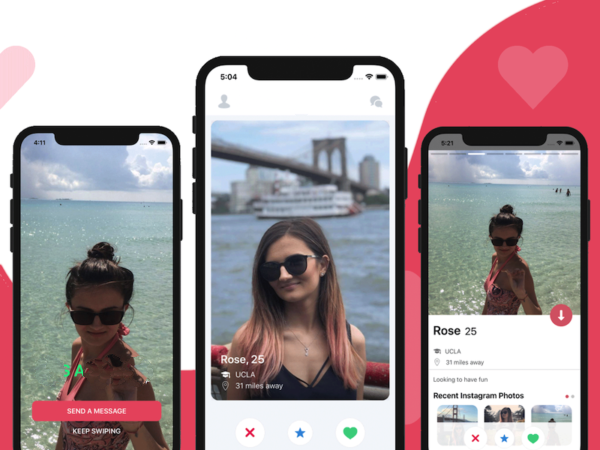
Ship a polished, production-ready React Native dating app in hours — not months. This template pairs a swipe-first discovery experience with secure authentication, real-time Firebase chat, and built-in monetization so you can prototype, validate, and launch quickly.
Build a fully functional e-commerce app for iOS and Android in minutes using our premium React Native e-commerce template. This guide walks through setup, Firebase integration, Stripe payments, and publishing to app stores.
These free Android templates can reduce setup work when you are learning Kotlin or validating a product idea. Treat each repository as a starting point: verify its license, dependencies, Firebase setup, target API level, and open issues before building on it.
Android development has skyrocketed in popularity within the last decade. Android devices dominate the mobile market, and with Kotlin now widely adopted, mobile developers have great tools for building beautiful, performant apps. In this article we list the best free Android app templates to help you speed up your projects.
Practical product notes
Get the next useful guide
Occasional tutorials, product resources, and lessons from building and launching software.