How to Build an Android Chat Application in Kotlin
In this step-by-step tutorial we'll build a real-time Android chat application in Kotlin. This guide reuses the full source code from our premium Android Chat App.
How to Build an Android Chat Application in Kotlin
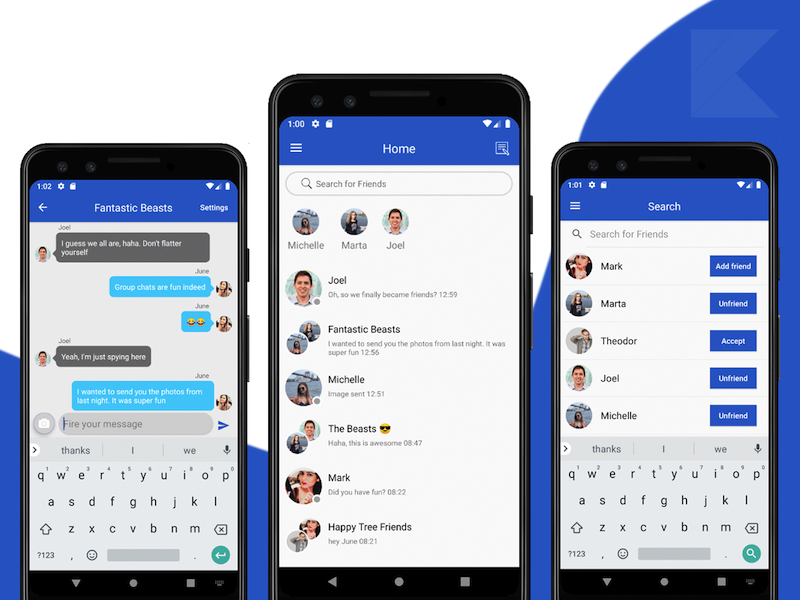
To build a fully-fledged Android chat application you should include these core features:
- Real-time Messaging
- Photo Messaging
- Private Messaging
- Group Chatting
- Push Notifications
- Messages Archive
- Online Status
We leverage Firebase as the backend. More specifically we use:
- Firebase Auth — user management (Login, Registration, Facebook Login, Google Login, etc.)
- Firebase Firestore — real-time database for users and messages
- Firebase Storage — stores photos and videos sent from the app
- Firebase Cloud Messaging — sends real-time push notifications to message recipients
High-level steps to get started:
- Open & Run the Kotlin project in Android Studio
- Override
google-services.jsonwith your own file (downloaded from Firebase Console). This will wire the chat application to your Firebase project. Enable Firebase Auth providers and Firebase Storage; for Firestore, set read/write rules appropriately during development. - Publish the app to Google Play Store
It looks straightforward — we'll walk through these milestones and also cover enabling push notifications.
Enable Push Notifications Safely
Firebase Cloud Messaging send requests must run in a trusted environment such as Cloud Functions or your application server. Never embed a service-account key, OAuth token, or legacy server key in the Android app. Anything shipped in the APK can be extracted.
Use this flow instead:
- Configure the Android client with your Firebase project's
google-services.json. - Retrieve the app instance's FCM registration token and send it to your authenticated backend.
- Store tokens with the owning user or installation and update them when Firebase rotates them.
- Send notifications from the backend with the Firebase Admin SDK or the FCM HTTP v1 API.
- Handle invalid or expired tokens and remove them from the backend.
The backend authenticates with Application Default Credentials, Workload Identity, or another securely stored service-account credential. Follow Firebase's official guides for the trusted server environment and FCM HTTP v1 API.
Test foreground, background, and terminated-app behavior before release. Also verify notification permission handling on supported Android versions.